The best website builder for SEO depends on what you publish. For a content-heavy site that lives on blog traffic, WordPress (self-hosted) still gives you the most control. For a design-led marketing site, Webflow gives you clean code and nearly every SEO control without plugins. For a small business on a budget, Wix or Squarespace are perfectly capable, and Wix now passes Core Web Vitals on more real sites than WordPress does. Selling products? Shopify. Running a publication or newsletter? Ghost.
But here's the part most "best builder for SEO" lists skip. Google doesn't rank platforms. John Mueller, who works on Google Search, put it plainly: "our search systems don't look for any particular content management system to treat it differently." So what does the builder actually decide? How easy it is to do good SEO. How fast your pages load for real visitors, how much control you have over the technical bits, and whether you can publish without fighting the tool every week.
So instead of ranking builders on vibes (which is what most of these lists do), we checked three things. Real-world speed data for about 3.3 million sites, a crawler test of 18 official templates (fetched the way Googlebot and ChatGPT's crawler see them), and every builder's own SEO documentation. We build client sites on WordPress, Webflow and Framer ourselves, so for those three you also get what we've learned the hard way.
Let's dive in!
Which website builder is best for SEO? Quick picks
| If you are... | Best pick | Why | From (billed yearly) |
|---|---|---|---|
| Publishing a lot of content (blog-led SEO) | WordPress | Unlimited control, the biggest SEO plugin ecosystem, any URL structure you want | Free software + hosting |
| A design-led company site | Webflow | Clean code, every core SEO control built in, JSON-LD per page, no plugins | $15/mo (Basic), $25/mo with CMS |
| A small business on a budget | Wix | Strong real-world speed, robots.txt editor, structured data, all in one | About $17/mo |
| A small business that wants simple and polished | Squarespace | Automatic sitemap and schema, fast enough, very little to break | $12/mo ($17 for code injection) |
| A startup landing site, fast | Framer | Server pre-rendering, automatic sitemap and hreflang, quick to ship | $10/mo |
| Selling products online | Shopify | Built for ecommerce SEO, automatic canonicals, multi-market hreflang | $19/mo |
| A publication or newsletter | Ghost | Automatic schema, sitemap and canonicals, very light pages | $18/mo |
Does your website builder affect SEO?
Short answer? Not directly. Google has said for years that it doesn't give any CMS a ranking boost or penalty, and its own SEO Starter Guide says that creating content people find "compelling and useful" will influence your presence in search "more than any of the other suggestions in this guide." Mueller's comments are covered in Search Engine Journal.
But that doesn't mean the platform is irrelevant. It affects SEO indirectly, in four ways that really do matter:
- Speed for real visitors. Core Web Vitals are part of Google's page experience signals, and some platforms make fast pages much easier than others (see the data below).
- Technical control. Can you edit robots.txt, set canonicals, add redirects in bulk, write your own structured data? Some builders lock these down.
- URL structure. Some force prefixes like /post/ or /products/ you can't remove. Not a ranking problem, but a pain if you ever migrate.
- Publishing friction. The platform your team actually enjoys using is the one that gets content published. That matters more than any technical setting.
Which builders are fastest for real visitors? (Core Web Vitals data)
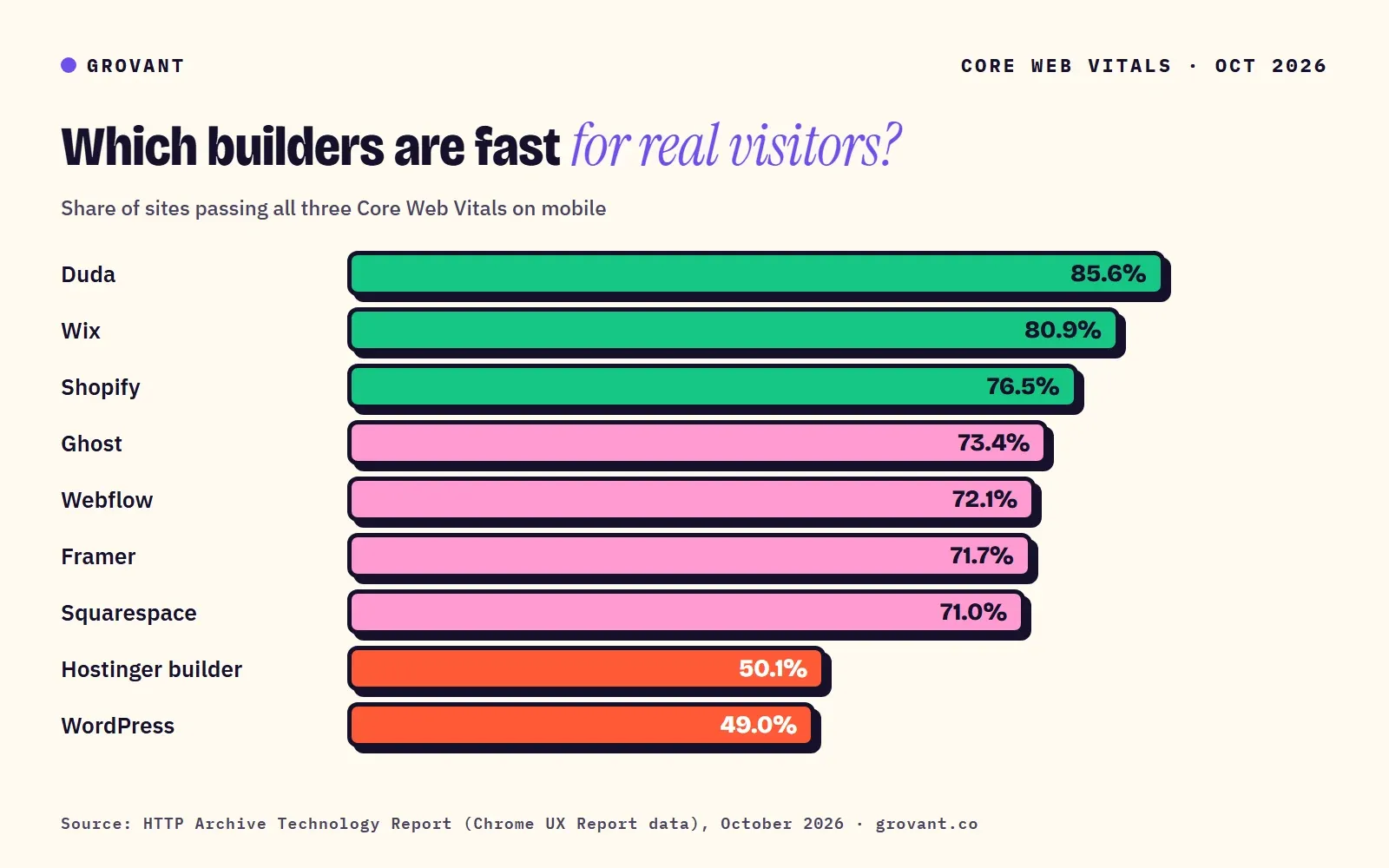
This is the most useful number in the whole comparison. And almost nobody uses it. The HTTP Archive Technology Report measures what share of real sites on each platform pass Google's Core Web Vitals, using Chrome data from actual visitors. Here's October 2026, the latest month available:
| Platform | Mobile: pass Core Web Vitals | Desktop: pass | Sites measured (mobile) |
|---|---|---|---|
| Duda | 85.6% | 87.8% | 39,929 |
| Wix | 80.9% | 87.2% | 165,196 |
| Shopify | 76.5% | 79.9% | 450,878 |
| Ghost | 73.4% | 64.2% | 2,860 |
| Webflow | 72.1% | 82.9% | 56,474 |
| Framer | 71.7% | 88.0% | 10,969 |
| Squarespace | 71.0% | 74.1% | 83,979 |
| Hostinger Website Builder | 50.1% | 82.6% | 3,243 |
| WordPress | 49.0% | 54.0% | 2,513,839 |
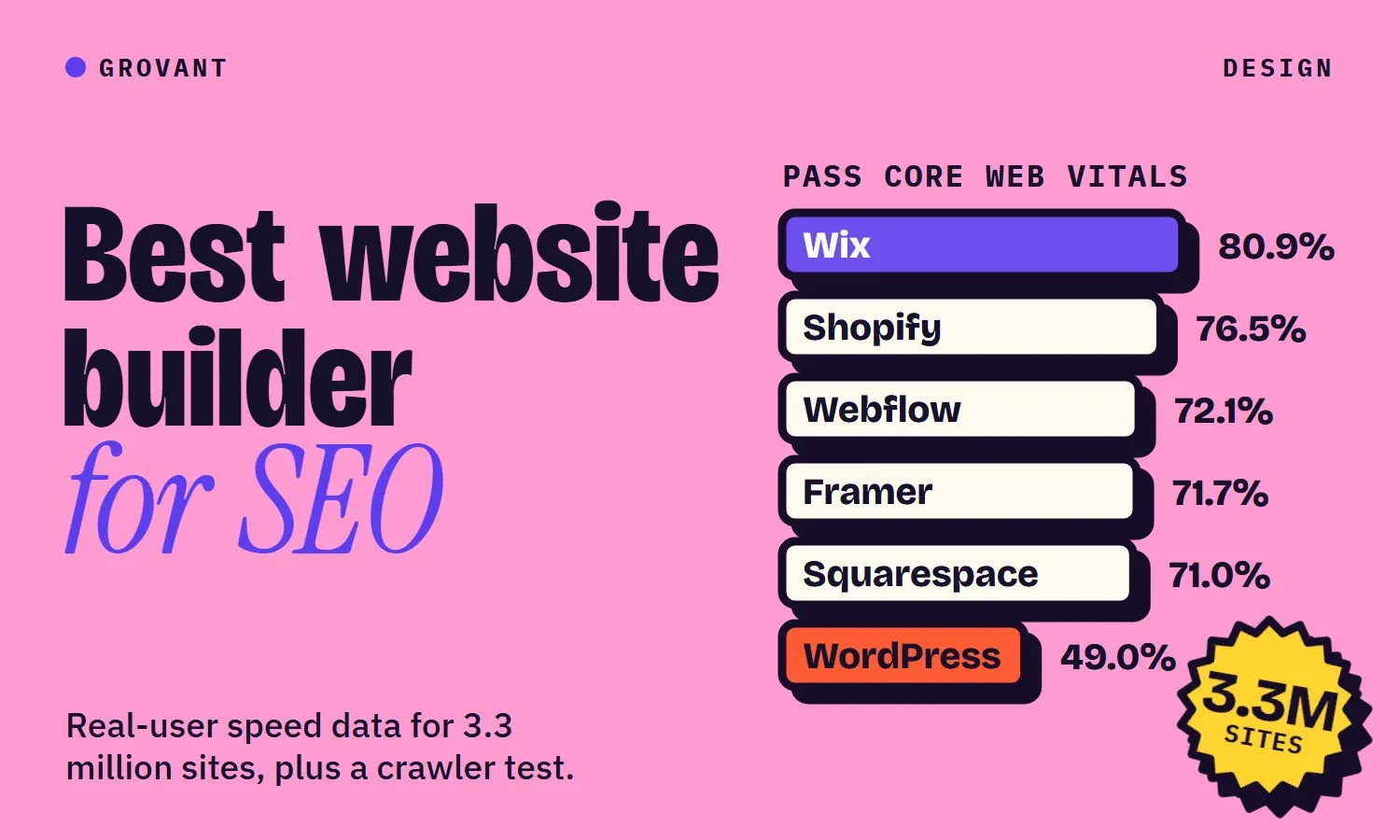
See anything surprising? Three things jump out. First, hosted builders now beat WordPress comfortably on speed: Wix passes on mobile for 80.9 percent of sites, WordPress for 49 percent. That's a big turnaround for Wix, which the 2025 Web Almanac shows jumping from 55 to 74 percent in a single year. Second, WordPress's number isn't really about WordPress. It's 2.5 million sites on every kind of hosting, theme and plugin stack, and plenty of them are slow because nobody looks after them. A well-built WordPress site can be very fast. It just doesn't happen by default. Think of it like a sports car with no maintenance plan: brilliant when someone looks after it, a money pit when nobody does.
Third, these are averages across very different sites. A pass rate tells you how much the platform helps with speed, not how fast your particular site will be. Treat it as "how much help you get", not a guarantee.
Can Google and AI crawlers read every builder's pages?
Why does this matter so much in 2026? Because Google renders JavaScript, but most AI crawlers don't. Vercel's analysis of AI crawler traffic found that none of the major AI crawlers render JavaScript, including OpenAI's and Anthropic's. That's right. If your text only appears after JavaScript runs, ChatGPT's crawler may see a blank page where your homepage should be. So we fetched 18 official template demos without running JavaScript, once as a normal browser and once as GPTBot, OpenAI's crawler, and checked what was actually there.
| Builder (demos tested) | Text in raw HTML? | Meta description out of the box | Canonical tag | Structured data out of the box | Raw HTML size |
|---|---|---|---|---|---|
| WordPress (3 themes) | Yes | None of 3 (needs a plugin) | 1 of 3 | None | 57–167 KB |
| Webflow (2) | Yes | None of 2 (template left it blank) | None on the webflow.io demo | None | 8–9 KB |
| Framer (4) | Yes | 4 of 4 | 4 of 4 | None | 143–586 KB |
| Wix (3) | Yes | None of 3 | 3 of 3 | 1 of 3 (LocalBusiness) | 815–1,328 KB |
| Squarespace (2) | Yes | None of 2 | 2 of 2 | 2 of 2 (WebSite, Organization) | 80–85 KB |
| Shopify (2) | Yes | None of 2 | 2 of 2 | 2 of 2 (Organization, WebSite) | 258–338 KB |
| Ghost (2) | Yes | 2 of 2 | 2 of 2 | 2 of 2 (WebSite, Organization) | 49–79 KB |
The result? A few things you might not expect:
- Every builder now serves readable HTML. The old fear that Wix or Framer sites are invisible JavaScript blobs is out of date. All 18 demos had their text in the HTML, and none blocked GPTBot.
- Defaults are not SEO. Most templates ship without a meta description. That's not the builder's fault, it's an empty field waiting for you. But it does mean "SEO-friendly builder" only helps if someone fills things in.
- Page weight varies a lot. A Webflow demo page was 8 KB of HTML. A Wix demo was over a megabyte, with 60 to 77 script tags. Wix still scores well on real-user speed, so its engineering clearly copes, but heavy pages leave less room for your own additions.
- Ghost, Squarespace and Shopify add structured data automatically. On the others you add it yourself, through a plugin or custom code.
What SEO controls does each builder give you?
| Control | WordPress | Webflow | Wix | Squarespace | Framer | Shopify | Ghost |
|---|---|---|---|---|---|---|---|
| Meta title and description | Plugin | Yes | Yes | Yes | Yes | Yes | Yes |
| XML sitemap | Yes (core) | Yes | Yes | Yes, not editable | Yes | Yes | Yes |
| Edit robots.txt | Yes | Yes | Yes | No | Pro plan | Yes (code) | Theme file |
| Custom canonical per page | Plugin | Yes | Yes | Automatic | Limited | Automatic | Yes |
| Bulk 301 redirects | Plugin | Yes (CSV) | Yes (CSV) | Yes (URL mappings) | Pro plan | Yes | Yes (file) |
| Custom JSON-LD | Plugin | Yes (per page) | Yes | Code injection | Custom code | Theme code | Code injection |
| Automatic schema | Plugin | No | Some | Yes | No | Theme | Yes |
| Multilingual hreflang | Plugin | Localize add-on | Wix Multilingual | Weglot | Locales add-on | Markets | Not documented |
| llms.txt | Plugin | Upload | Auto (some plans) | Toggle (7.1) | Static file | Built in | Built in |
Before you over-read that table, two quick notes. A missing control only matters if you actually need it: most small business sites never touch robots.txt. And llms.txt is a nice-to-have, not a ranking factor. We covered why in our llms.txt explainer.
The best website builders for SEO, one by one
1. WordPress: best for content-heavy SEO
Best for: blogs, publishers, service businesses that win on content, anyone who wants full control. WordPress runs about 39 percent of all websites, according to W3Techs, and for SEO it's still the most flexible option. Any URL structure, any schema, unlimited pages, and free plugins like Rank Math or Yoast that handle meta tags, redirects, canonicals and even llms.txt.
The catch: WordPress gives you rope. Only 49 percent of WordPress sites pass Core Web Vitals on mobile, the lowest of any major platform, and almost always for the same reasons: cheap hosting, heavy page-builder themes and too many plugins. You also own updates and security. Our experience: when we build on WordPress we keep the plugin count low, use a lightweight theme and decent managed hosting, and the speed problem mostly disappears. If nobody on your side will look after it, pick something hosted.
Price: the software is free. Budget for hosting and a premium theme or plugins if you need them.
2. Webflow: best for design-led company sites
Best for: marketing sites where design matters and a small team updates content. Webflow builds every core SEO control in, without plugins: per-page meta tags, an editable robots.txt, a global canonical you can override per page, CSV redirect imports, a JSON-LD field on every page (bindable to CMS fields), responsive images with WebP and AVIF conversion, and an llms.txt upload. Its demo pages were the leanest we tested, at 8 to 9 KB of HTML.
The catch: price climbs once you need the CMS and more than a few hundred items, and multilingual is a paid Localize add-on. 72 percent of Webflow sites pass Core Web Vitals on mobile, good but not best in class, usually because of heavy animations and oversized images. Our experience: when we build on Webflow, the SEO controls are all there, but we fill in the meta description and Open Graph fields for every page and CMS template, because templates ship them blank.
Price: Basic $15/mo billed yearly (no CMS, 300 pages), Premium $25/mo billed yearly with up to 20,000 CMS items.
3. Wix: best all-in-one for small businesses
Best for: small businesses that want everything in one place and don't have a developer. Wix has the reputation of being bad for SEO, and that reputation is years out of date. In October 2026, 80.9 percent of Wix sites passed Core Web Vitals on mobile, second only to Duda and far ahead of WordPress. It now has a robots.txt editor, custom canonicals, CSV redirect imports (up to 500 per file), custom JSON-LD, automatic WebP images, built-in hreflang with Wix Multilingual, and an auto-generated llms.txt.
The catch: blog posts live under a /post/ folder you can rename but not remove, the pages are heavy under the hood (our demos were 0.8 to 1.3 MB of HTML), and moving off Wix later means rebuilding the site rather than exporting it. Our take: we don't build on Wix, so this is based on the data and docs. For a local business site that will never have a developer, it's a sound choice.
Price: Light plan from about $17/mo billed yearly; prices vary by country.
4. Squarespace: best for simple, polished small sites
Best for: portfolios, restaurants, studios and small service businesses that want something beautiful with very little to configure. Squarespace adds structured data automatically (Website, Organization, Local Business, Blog Post, Event and Product), generates the sitemap, serves WebP images, and has a simple "block known AI crawlers" setting. 71 percent of its sites pass Core Web Vitals on mobile.
The catch: less control than anyone else here. You can't edit robots.txt or the sitemap, the automatic schema can't be edited or removed, and code injection (needed for custom structured data) starts on the $17 Core plan. Our take: fine for SEO if your site is small and your content is good. Frustrating if you want to do anything technical.
Price: Basic $12/mo billed yearly; Core $17/mo adds code injection.
5. Framer: best for fast startup sites
Best for: startups and product teams who want a good-looking site live this week. Framer pre-renders pages on its servers, so the HTML is complete for crawlers, and it handles sitemaps, canonicals, AVIF images with WebP fallback, and hreflang for its Locales add-on automatically. All four Framer demos we tested had a meta description and canonical tag out of the box, the best default result in our test.
The catch: the CMS is small (1,000 items and 30 pages on Basic), redirects and a custom robots.txt need the $30 Pro plan, and structured data means pasting JSON-LD into custom code. Content inside overlays isn't crawlable. Our experience: Framer is at its best for launch sites and landing pages. For a site that will grow into hundreds of articles, we'd pick Webflow or WordPress instead.
Price: Basic $10/mo; Pro $30/mo for redirects, a custom robots.txt and more CMS room.
6. Shopify: best for ecommerce SEO
Best for: online stores. Shopify handles the ecommerce SEO basics well: automatic canonicals, an automatic sitemap, editable handles, WebP and AVIF images, hreflang through Shopify Markets on every plan, up to 100,000 redirects, and a built-in llms.txt. 76.5 percent of Shopify stores pass Core Web Vitals on mobile, across more than 450,000 sites.
The catch: fixed URL paths like /products/ and /collections/, and robots.txt edits are a code customization Shopify doesn't support. Structured data depends on your theme. Our take: if you sell products, the ecommerce features matter far more than these limits.
Price: Basic $19/mo billed yearly.
7. Ghost: best for publishers and newsletters
Best for: writers, newsletters and media sites. Ghost is the most SEO-complete platform out of the box: meta fields, automatic canonicals, an automatic sitemap and automatic structured data on every post, plus native llms.txt and Markdown versions of posts since July 2026. Its demo pages were among the lightest we tested and had the most readable text.
The catch: it's a publishing tool, not a general website builder, and custom themes (needed for things like a custom robots.txt) start on the $29 Publisher plan. Our take: if your business is your writing, Ghost is excellent.
Price: Starter $18/mo billed yearly; Publisher $29/mo for custom themes.
What about Duda, Hostinger and GoDaddy?
Duda had the best Core Web Vitals pass rate in the data (85.6 percent on mobile), but it's sold mainly through agencies and SaaS platforms rather than to businesses directly, so it rarely comes up as a choice. Hostinger's builder passes on only half of mobile sites, and GoDaddy's builder has too few sites in the dataset to say much. We didn't test any of them hands-on, and we'd rather leave them out than guess. So they're not in our picks.
How to choose: five questions
- Will you publish more than about 100 articles? Lean WordPress or Webflow. Framer's and Squarespace's content tools get cramped.
- Who updates the site? If it's a non-technical team with no developer, Wix, Squarespace or Webflow will get used. WordPress without an owner gets slow and stale.
- Do you sell products? Shopify, almost always.
- Do you need several languages? Check the add-on price: Webflow Localize, Framer Locales and Wix Multilingual all cost extra, Shopify Markets doesn't.
- Will you ever want to move? Self-hosted WordPress and Ghost are the easiest to leave. Wix, Squarespace and Framer are the hardest.
The bottom line
Here's the bottom line. No website builder will rank a site with thin content, and none will stop a great one. Pick the platform your team will actually publish on, make sure it's fast for real visitors, and fill in the basics the template leaves blank. If speed and technical control are your priorities, the data favors Webflow and the hosted builders. If content volume and flexibility are, WordPress still wins, as long as someone looks after it.
Already have a site and wondering whether it's the platform or the design holding you back? Start with the design mistakes that quietly cost conversions, and if you're torn between the top three, our Webflow vs WordPress vs Framer comparison goes deeper on cost and upkeep.
Want us to deliver this for you?
One senior specialist, start to finish. Free proposal, no pressure.