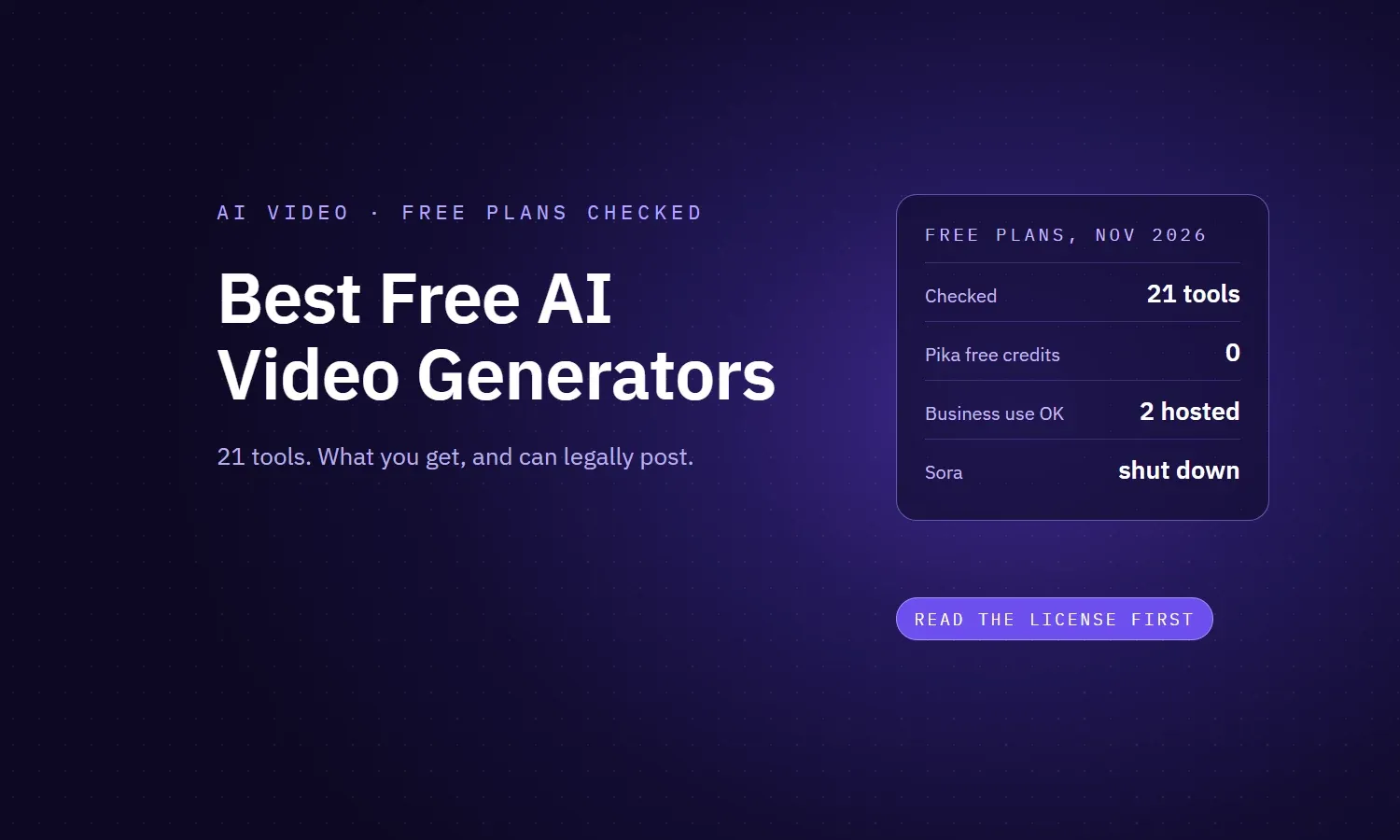
Last checked: 12 November 2026. Every plan detail below comes from the vendor's own pricing page, help center or terms.
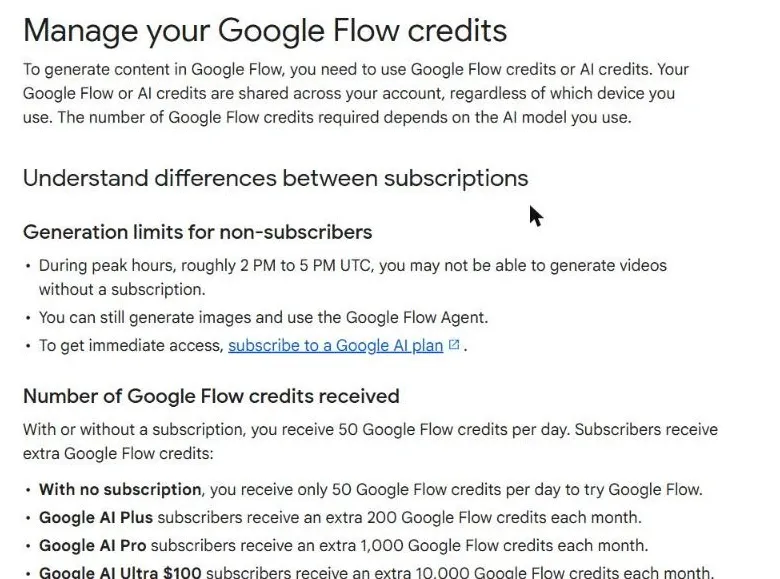
The best free AI video generator in 2026 is Google Flow. It gives you 50 credits a day, which is about five short Veo clips at 720p, with image-to-video included and no visible watermark in most countries. If you need to use the video for business, start with Adobe Firefly instead: it's one of only two hosted tools whose terms say in writing that free output can be used commercially. And if you want unlimited clips, Bing Video Creator has no cap at its slow speed, while open-source Wan 2.2 runs free forever on your own GPU.
The longer answer is messier, because "free" means different things from tool to tool. Some refill your credits daily, some give you a one-time trial, and a few famous names now give you nothing. OpenAI's Sora, which still shows up in plenty of these lists, doesn't exist anymore. And here's the part almost nobody checks: most free plans don't let you post the result in an ad or on a client's account. Let's dive in!
Which free AI video generator should you use?
| If you want | Use | Why |
|---|---|---|
| The best free quality, every day | Google Flow | 50 credits a day, Veo 3.1 Lite and Omni models, image-to-video, up to 720p |
| Video you can use for business, free | Adobe Firefly | Daily free generations, and Adobe allows commercial use of non-beta output |
| As many clips as possible | Bing Video Creator | Unlimited at Standard speed, though clips can take hours |
| The biggest daily credit balance | Dreamina (Seedance) | 120 credits a day for US accounts, more in some countries |
| Animating your own images daily | PixVerse | 30 credits that reset every day, plus 60 on sign-up |
| One serious test of a pro tool | Runway | 125 one-time credits, and no non-commercial restriction |
| A talking presenter video | HeyGen | Up to 3 avatar videos a month, but not for commercial use |
| Truly unlimited and commercial | Wan 2.2 (open source) | Apache 2.0 license, runs on a 24GB GPU, no credits ever |
How we checked these tools
Most articles on this topic are written by companies selling an AI video generator (funny how they always come first), and they disagree on basic facts like whether Kling's free credits refresh daily. So we skipped them and read each tool's own pricing page, help center and terms on 12 November 2026, recording free credits, refresh rate, clip limits, watermark and commercial rights. Where a vendor doesn't publish a number, we say so. We didn't score output quality, because models change monthly and plan terms decide whether you can use a tool at all.
The free plan scorecard: 21 tools checked
| Tool | Free allowance | Watermark on free | Commercial use on free |
|---|---|---|---|
| Google Flow | 50 credits a day, no rollover | Invisible SynthID; visible only in India, South Korea and Vietnam | Not stated; Google doesn't claim ownership |
| Adobe Firefly | Limited daily generations (number not published) | Not stated | Yes, for non-beta features |
| Bing Video Creator | 10 Fast a day, unlimited Standard | No visible logo stated; C2PA credentials | Not stated; terms say "for entertainment purposes" |
| Dreamina (Seedance) | 120 credits a day (US) | Yes | Unclear; you own outputs, service "generally" non-commercial |
| PixVerse | 60 on sign-up + 30 a day | Yes | No |
| Meta AI (Vibes) | Free, limit not published | Not stated | Not stated |
| Vidu | Sign-up bonus + daily login credits (amounts not published) | Yes | No |
| Kling AI | Sign-up + monthly login credits (amounts not published) | Yes | No |
| Hailuo (MiniMax) | One-time welcome credits, expire in 3 days | Yes | No |
| Runway | 125 credits, one-time | Yes | Yes |
| Luma | Free trial only (amount not published) | Yes, can't be removed later | No |
| HeyGen | 1 to 3 avatar videos a month | Yes | No |
| Grok Imagine | Free video access not confirmed | Yes, can't be removed | Not stated |
| invideo AI | Weekly limit (amount not published) | Not stated | Not stated |
| Pika | 0 credits; packs from $25 | No | No |
| Wan 2.2 (local) | Unlimited on your own GPU | No | Yes, Apache 2.0 |
| LTX-2.5 (local) | Unlimited on your own GPU | No | Yes, if revenue is under $10M |
| OpenAI Sora | Discontinued | n/a | n/a |
| Gemini app | No free video | n/a | n/a |
| Google AI Studio / API | No free video tier | n/a | n/a |
| Canva "Create a video clip" | Not on Canva Free | n/a | n/a |
The three kinds of "free" (and why it matters)
- Daily allowance. Credits refill every day but don't roll over. Google Flow, Dreamina, PixVerse and Adobe Firefly work this way, and Bing's Standard speed has no cap at all. This is the only kind of free you can build a habit on.
- One-time trial. You get a balance once and that's it. Think Runway's 125 credits, Hailuo's welcome credits (gone in three days) and Luma's trial. Treat these as a test drive, not a tool.
- Free account, no free video. You can sign up, but making video costs money. That's Pika (zero monthly credits), Canva's video clip tool and the Gemini app.
Kling sits between the first two: daily login credits are for subscribers, while free accounts get sign-up and monthly login credits in unpublished amounts. That's why guides disagree about it.
The 12 best free AI video generators, ranked
We ranked these by how useful the free plan is for marketing content: how much you get, how often it refills, and whether you're allowed to publish the result.
1. Google Flow: best free AI video generator overall
Flow is Google's filmmaking tool, and right now it's the most generous free route to top-tier video. Without a subscription you get 50 credits a day. Veo 3.1 Lite costs 10 credits for a 4, 6 or 8 second clip at 720p, so that's about five clips a day. Gemini Omni Flash 1.2 is also there, at 1 credit per second at 360p or 3 at 720p, for clips up to 10 seconds. And yes, image-to-video ("Frames to Video") is included on the free plan.
- Refresh: daily, starting from your first generation. Unused credits don't roll over, per Google's Flow credits page.
- Limits: free users may be blocked during peak hours, roughly 2 PM to 5 PM UTC. Resolution tops out at 720p, and 1080p upscaling is for paying users.
- Watermark: everything gets an invisible SynthID mark. A visible watermark is only added for users in India, South Korea and Vietnam who aren't on the top Ultra plan, per the Flow FAQ.
- Business use: Google says it won't claim ownership of what you generate, but it never gives an explicit commercial-use yes. You also need to be 18+ and in a supported country.
- Heads up: Veo 3.1 Fast and Veo 3.1 Quality retire on December 5, 2026. Quality costs 100 credits, which is more than a whole free day, so you'd skip it anyway.
Our take: if you only try one tool, make it this one. Five Veo clips a day works out to roughly 150 a month, as long as you show up daily.
2. Adobe Firefly: best free option for business use
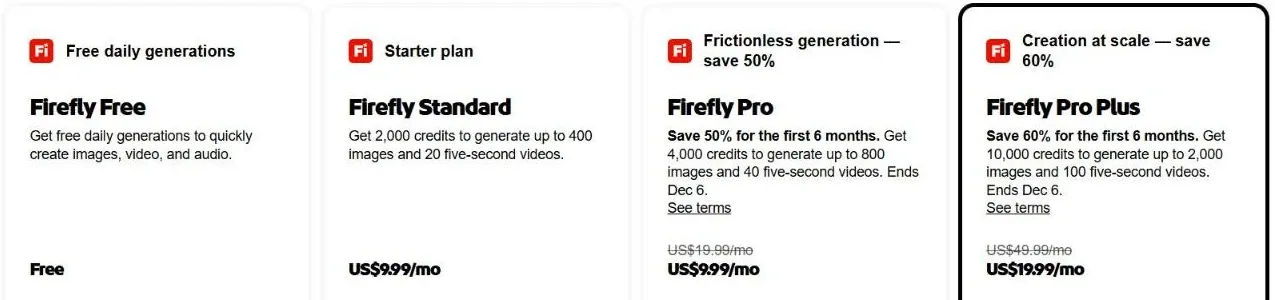
Firefly's free plan is smaller, but it's the one we'd trust for client work. Adobe gives "limited free daily generations for images and video" on a curated set of models, without publishing the number. Clips are 5 seconds long.
- Business use: Adobe's generative credits FAQ says you can use output from non-beta features in commercial projects, and it doesn't carve out free users. One catch: if you pick a partner model inside Firefly instead of Adobe's own, Adobe says checking that output is on you.
- Indemnity: Adobe's IP indemnification is for eligible enterprise customers only, not free users.
- Upgrade: Firefly Standard is $9.99 a month for 2,000 credits, which Adobe says covers up to 20 five-second videos.
3. Bing Video Creator: best for unlimited free clips
Microsoft's tool is the closest thing to unlimited among hosted generators. The Bing Create page gives you 10 Fast creations that come back the next day, plus unlimited creations at Standard speed. The catch? A Standard clip can take a few hours. Clips are 5 seconds long in vertical 9:16, and you need to sign in.
- Watermark: Microsoft attaches C2PA content credentials, which you're not allowed to remove. It doesn't mention a visible logo.
- Business use: Microsoft's Image Creator terms don't claim ownership of your creations, but call the service "for entertainment purposes" and make you indemnify Microsoft. We wouldn't put these in a paid ad.
- Model: Microsoft's launch post says it runs on Sora. That post hasn't been updated since OpenAI shut down the Sora API in September 2026, so we can't confirm what powers it today.
4. Dreamina (Seedance): biggest daily credit balance
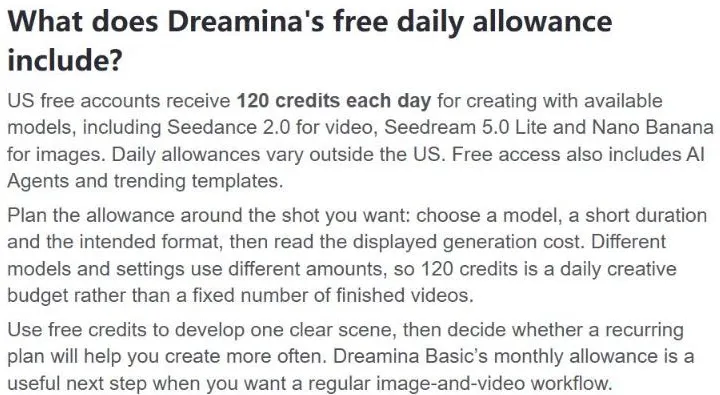
Dreamina is CapCut's AI studio, and it runs ByteDance's Seedance models. Its guide to free limits gives US free accounts 120 credits a day (other Dreamina pages list 105 in the UK and 225 in Australia, Indonesia and Japan). Seedance 2.0 makes clips of 4 to 15 seconds, with sound.
- Cost per clip: Dreamina doesn't publish it, so we can't tell you how many clips 120 credits buys.
- Watermark: yes, on free downloads.
- Business use: unclear. The terms say you own your outputs, but they also describe the service as generally for private, non-commercial use. That's not a green light.
- Upgrade: Basic is $15 a month for 1,575 credits on Dreamina's pricing page.
5. PixVerse: best for animating your own images daily
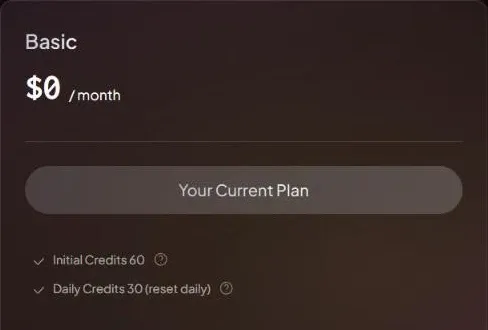
PixVerse has one of the clearest free plans around. The Basic plan gives you 60 credits on sign-up plus 30 a day, which reset at 00:00 UTC and don't roll over. Output goes up to 540p, and you can start from text or from your own image.
- Cost per clip: not published for the web app. Going by PixVerse's API pricing, 30 credits is roughly one short clip a day, so treat that as an estimate.
- Watermark: yes, until you pay.
- Business use: no. PixVerse's terms limit free output to non-commercial use. Here's a useful detail, though: buying even a one-off credit pack unlocks commercial rights for what you make with it.
- Upgrade: Standard is $10 a month ($8 billed yearly) for 1,200 credits, no watermark and commercial use.
6. Meta AI (Vibes): easiest free option on your phone
Vibes lives inside the Meta AI app. You create an image, tap Animate, and add music if you like. It's quick and fun, but Meta publishes almost nothing about its limits.
- Limits: Meta doesn't publish a daily cap, clip length or resolution, and features vary by country.
- Business use: Meta's AI terms are silent on who owns the output and tell you not to rely on outputs for any purpose.
- Privacy: Meta says it uses your interactions with its AIs to improve AI at Meta.
7. Runway: best one-time test of a pro tool
Runway is one of the most capable video platforms out there, but its free plan is really a trial. You get 125 credits, and Runway's help center is blunt that they "do not renew or refresh once spent". Gen-4.5 costs 12 credits per second, so that's about 10 seconds of video, assuming Gen-4.5 is in the "limited set" of tools free users get. Plan those two shots carefully.
- Watermark: yes, on every free video.
- Business use: yes. Runway's usage rights page says your content is "yours to use without any non-commercial restrictions from us".
- Upgrade: Standard is $15 a month ($12 billed yearly) for 625 credits, no watermark and all models.
8. Kling AI: realistic motion, but read the fine print
Kling makes some of the most realistic motion in AI video, which is why it's on every list. But its free plan has quietly shrunk. Kling's credits policy reserves daily login credits for subscribers, so free users get sign-up credits and monthly login credits, in amounts Kling doesn't publish.
- Limits: 1080p, watermark removal, video extension and the fast queue are all premium-only.
- Business use: no. Kling's terms of service bar using output "for any commercial purposes" without written permission, and they ask you to label outputs as made with Kling AI.
- Upgrade: Kling's own July 2026 guide lists the Standard plan at $6.99 for the first month, with 660 credits.
9. Hailuo (MiniMax): a short welcome, then pay
Hailuo is known for strong physics and camera movement. Free users, though, only get a one-time welcome package of credits that expires three days later, according to its subscription terms. On Hailuo 2.3, a 6 second clip at 768p costs 25 credits.
- Queue: free users can line up three tasks but only generate one video at a time.
- Watermark: yes, on free downloads.
- Business use: no. Hailuo's terms of use allow personal, non-commercial use only.
- Upgrade: Hailuo's homepage shows plans from $9.99 a month.
10. Vidu: cheap clips, vague allowance
Vidu's pricing page offers a sign-up bonus and daily login credits, and its Q4 model costs about 10 credits for a 5 second 540p clip. The problem? Vidu never says how many free credits you actually get, and its own blog posts disagree.
- Watermark: yes, on free downloads.
- Business use: no. Vidu's terms limit free use to personal, non-commercial purposes.
- Upgrade: Standard is $10 a month for 800 credits.
11. HeyGen: best free avatar video
HeyGen does something different: a digital presenter reads your script on camera. The free plan gives you 1 to 3 videos a month depending on your region, each up to a minute long, at 720p with a watermark. You also get one custom avatar and one voice clone.
- Business use: no, and this one catches people out. HeyGen's terms limit free-plan content to "personal, non-commercial, and internal evaluation purposes" and specifically rule out advertising and client work.
- Upgrade: Creator is $29 a month ($24 billed yearly) for 1080p, no branding and commercial use.
12. Wan 2.2 and LTX-2.5: truly free, if you have the hardware
If you want no credits, no watermark and no license worries, run an open model on your own machine. These are the only options here that are genuinely unlimited and fine for commercial use.
- Wan 2.2 (Alibaba): Apache 2.0, and the team claims no rights over your output. The TI2V-5B model needs a 24GB GPU like an RTX 4090 and makes a 5 second 720p clip in under 9 minutes, per the Wan 2.2 repo. No audio.
- LTX-2.5 (Lightricks): makes video with synchronized audio from text or images. Its community license allows free commercial use for companies under $10 million in annual revenue.
Is there an unlimited free AI video generator?
Not among the hosted tools, with one slow exception. Bing Video Creator lets you make unlimited 5 second clips at Standard speed, but each one can take hours. For unlimited generation you can also use commercially, run an open model on your own computer: Wan 2.2 is Apache 2.0 licensed and needs a GPU with at least 24GB of memory, and LTX-2.5 is free for companies under $10 million in annual revenue. Every other free plan on this list caps you by daily, monthly or one-time credits.
Which AI video generators are not free anymore?
- OpenAI Sora: discontinued. OpenAI's help center says the app ended on April 26, 2026 and the API on September 24, 2026.
- Gemini app: no free video. Google's help page says you need a Google AI plan, from $4.99 a month, to generate video.
- Google AI Studio and the Gemini API: no free video tier. Veo left the API on October 22, 2026, and Omni Flash has no free tier in Google's API pricing.
- Pika: the free plan has zero monthly credits, and credit packs start at $25, per its pricing page.
- Luma: the pricing page now starts at $30 a month, with an unspecified number of trial credits. Its licensing page says free content is for personal use only and keeps its watermark even after you upgrade.
- Canva: "Create a video clip" (Veo) isn't available on Canva Free, per its AI access page. Free users only get limited Image to Video clips, 5 seconds long and silent.
- Grok Imagine: we couldn't find an official page confirming free users can make video. Every Grok video has an unremovable watermark, and xAI's terms give it broad rights over what you generate.
- invideo AI: its help center mentions a free plan with a weekly limit, but publishes no numbers.
Can you use free AI videos in ads? Read this first
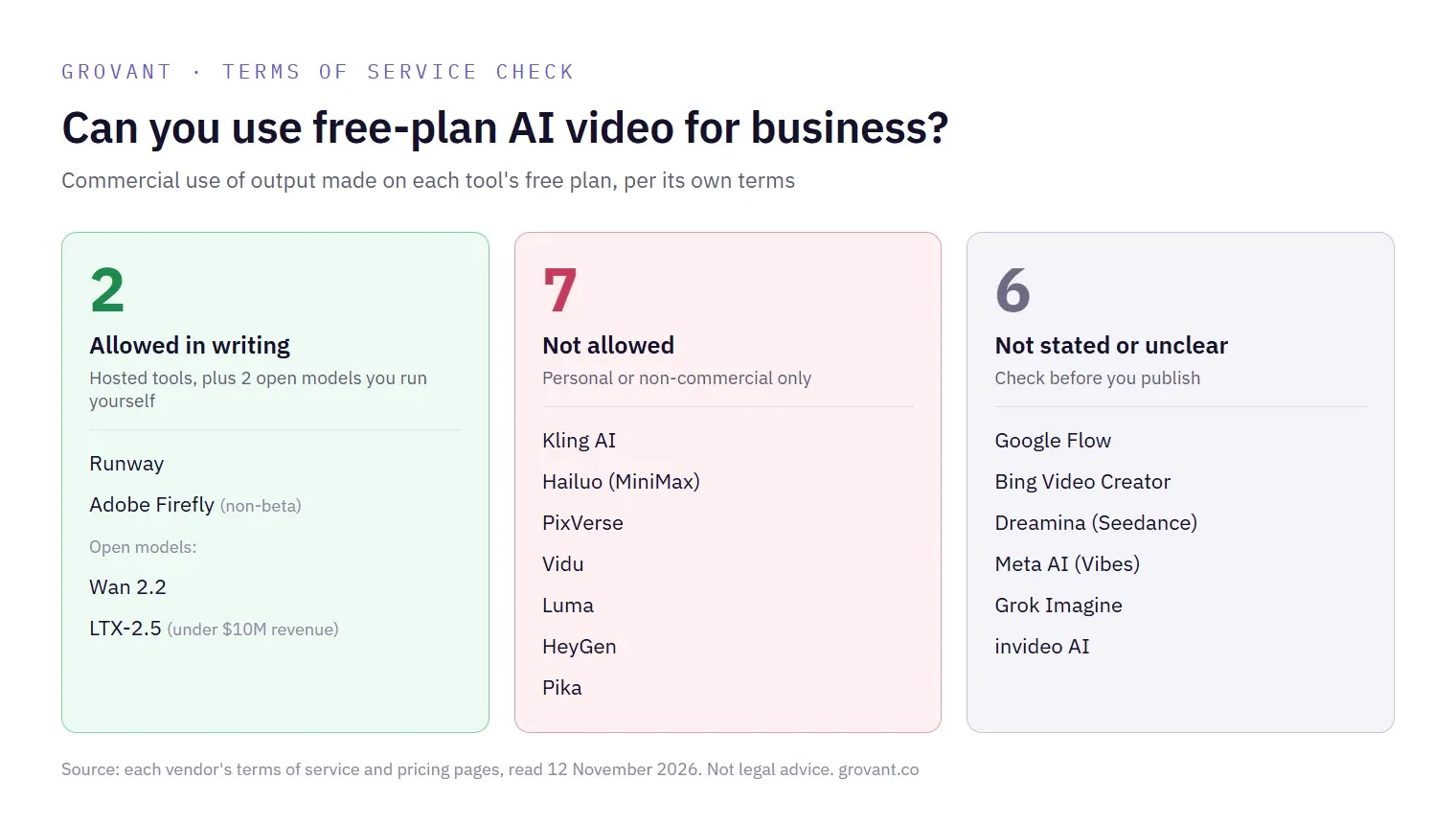
This is where people get burned. A great free clip goes into a Meta ad or a client's Reels, and only later does anyone read the terms. Here's how the tools split.
| Status | Tools |
|---|---|
| Free output allowed for commercial use, in writing | Runway, Adobe Firefly (non-beta features), Wan 2.2, LTX-2.5 (under $10M revenue) |
| Free output banned from commercial use | Kling, Hailuo, PixVerse, Vidu, Luma, HeyGen, Pika |
| Not stated or unclear | Google Flow, Bing Video Creator, Dreamina, Meta AI, Grok Imagine, invideo |
- Upgrading later usually doesn't fix it. Most terms tie commercial rights to content made while you're paying, so make the final version after you upgrade.
- "You own it" isn't the same as "you can use it commercially." Dreamina's terms say you own your outputs, yet call the service generally non-commercial. Read both lines.
- Invisible labels travel with the file. Flow's SynthID and Bing's C2PA credentials can be read by platforms, so plan on your clip being identified as AI-made.
Our Meta Ads team makes AI creative every sprint, and the licensing check comes before the brief, not after.
A $0 AI video workflow for marketers
You don't need one perfect free tool, just a system that uses each plan for what it's good at:
- Explore ideas in Bing Video Creator. Queue a few rough concepts in the morning and check back after lunch. They cost nothing.
- Make the hero shots in Google Flow. Spend your 50 daily credits on the ideas that worked, or animate your own product photos.
- Make anything going into an ad in Adobe Firefly or Runway. They're the hosted tools that clearly allow commercial use.
- Cut and caption in your usual editor. AI clips run 5 to 10 seconds, so you'll be stitching them together and adding audio anyway.
- Graduate to local or paid when volume grows. Once you're making video every week, a local Wan 2.2 setup or a $10 to $15 plan beats juggling free credits.
Budgeting? See our social media management pricing guide, or let our content and social practice run it for you.
The bigger picture
Free AI video is shrinking: Sora shut down, Pika's free plan went to zero, Luma swapped its free tier for a trial and Kling moved daily credits behind a subscription. Use free plans to learn and test ideas, because they're genuinely good for that. But the moment a video represents your brand or a client's, check the license and pay for the plan that covers it. Ten or fifteen dollars a month is a lot cheaper than pulling an ad. We'll keep this page updated, and our best AI visibility tools guide uses the same check-the-source method.