Search "business process automation examples" and you will find fifty articles listing the same ten bullet points: invoicing, onboarding, data entry. No triggers, no failure modes, no numbers. A list of nouns.
That is not an example. An example shows you the moving parts: what kicks the workflow off, what decision sits in the middle, where a human stays in the loop, and what the arithmetic looks like when it works. Because the difference between an automation that quietly earns money for years and one that becomes a support ticket is never the idea. It is the plumbing.
We build these systems for businesses, which means we also get called in when a homemade one falls over. So this guide does what the fifty listicles do not: for every example, the trigger, the flow, the exception lane, and honest math. In this guide, we'll cover the two-question test for picking your first automation, the anatomy every reliable workflow shares, and twelve examples across finance, sales, support, and operations. Let's dive in.
~60%
Of occupations have 30%+ automatable activities
McKinsey Global Institute
95%
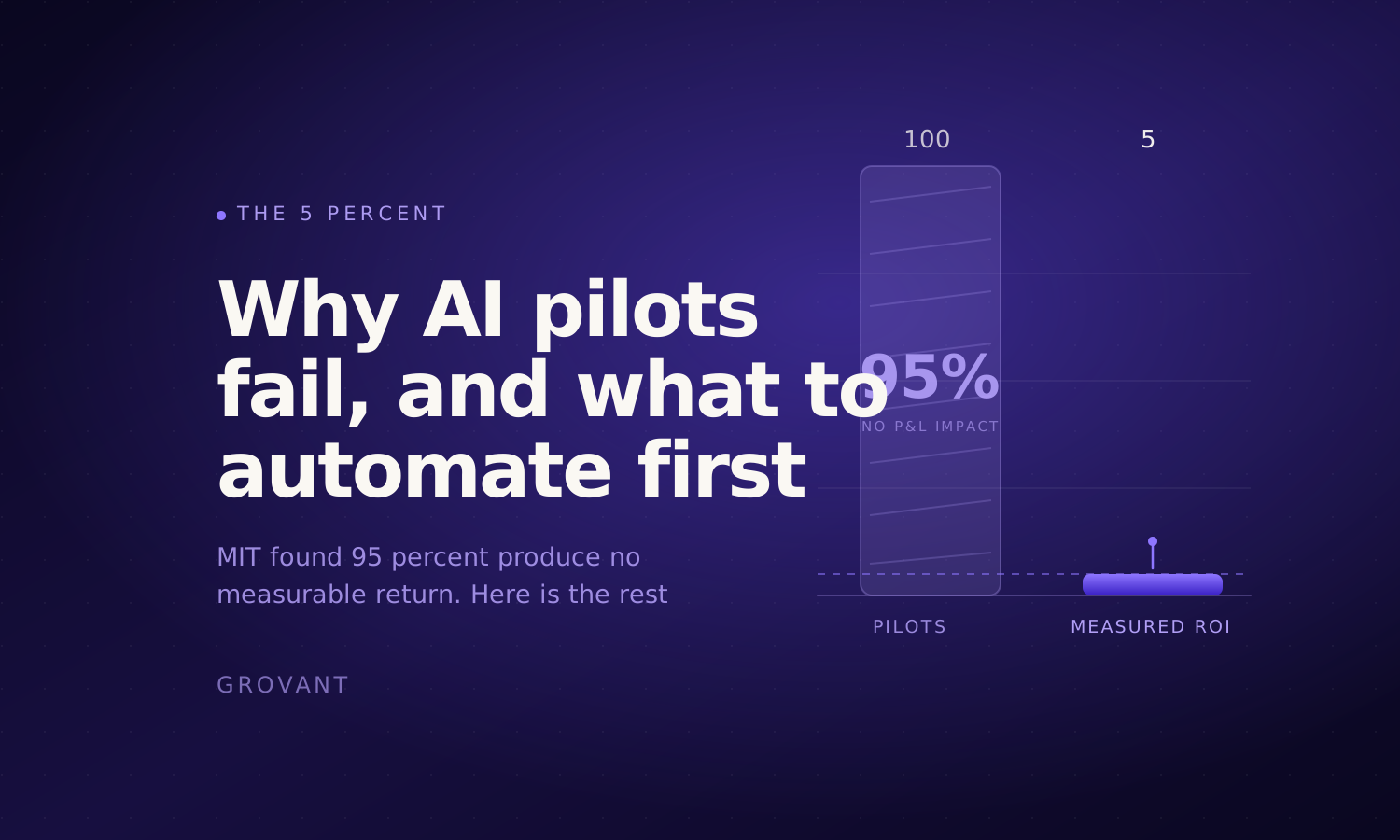
Of AI pilots show no measurable P&L impact
MIT research, reported by Fortune
~280x
Drop in AI inference cost, 2022 to 2024
Stanford AI Index
Those three numbers tell the whole story of this moment. McKinsey Global Institute's automation research found that in about 60 percent of occupations, at least a third of the day-to-day activities are technically automatable. The Stanford AI Index documented the cost of running AI falling roughly 280-fold in two years, so the economics now work even for small workflows. And yet MIT found 95 percent of corporate AI pilots produce no measurable return, because most automation projects start with a tool instead of a workflow. The potential is real, the price collapsed, and almost everyone still fumbles the execution. This guide is about being in the 5 percent.
First: which workflow deserves to go first
Before any examples, the picking framework, because choosing the wrong first workflow is the most common way this whole effort dies. Two questions sort every candidate:
- How often does it happen? Frequency is what pays back the build. A task that runs forty times a week compounds; a task that runs quarterly almost never earns its setup cost.
- How much judgment does it need? Rules-based work automates cleanly. Judgment work either needs a human-review lane or should stay with people entirely.
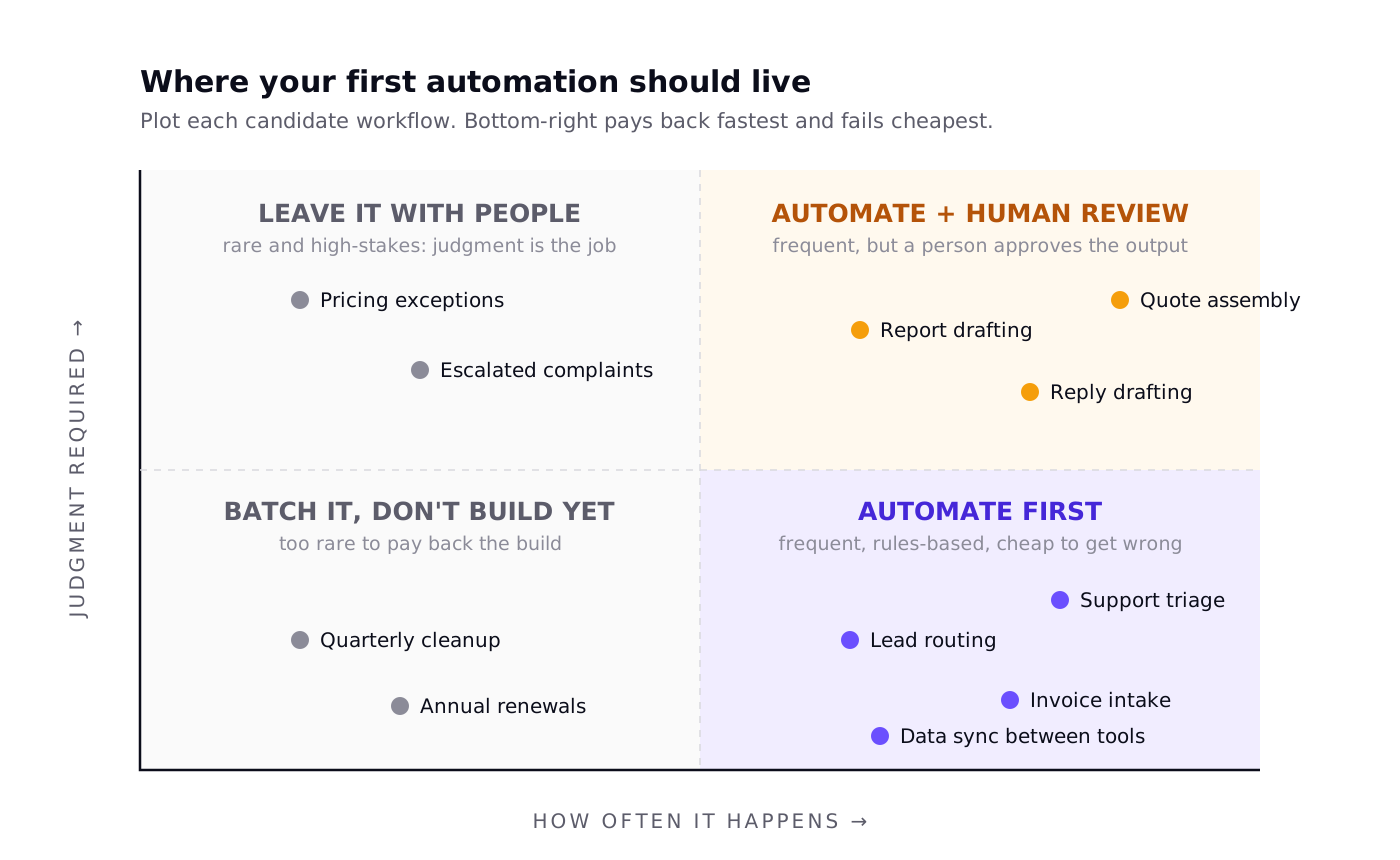
Everything in the bottom-right quadrant of Figure 1 shares a shape: frequent, rules-based, and cheap to get wrong because a mistake is caught and corrected in seconds. That is where the twelve examples below live, or in the top-right with a review lane attached. If a workflow is rare and every instance needs a judgment call, automating it is how you turn a hard job into a hard job plus a maintenance burden.
The anatomy every one of these shares
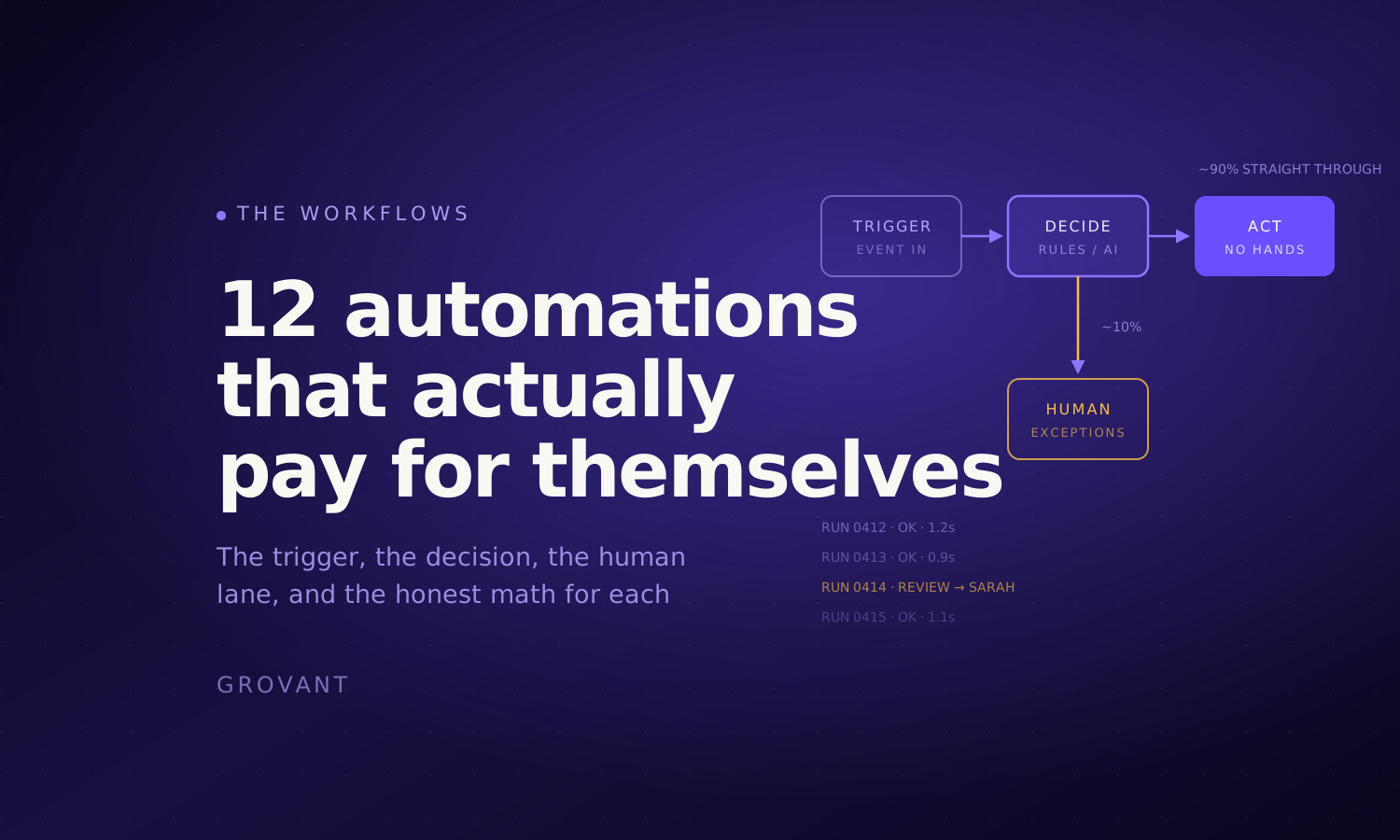
Every example below is the same five-part machine wearing different clothes. Learn the anatomy once and you can design your own versions all day:
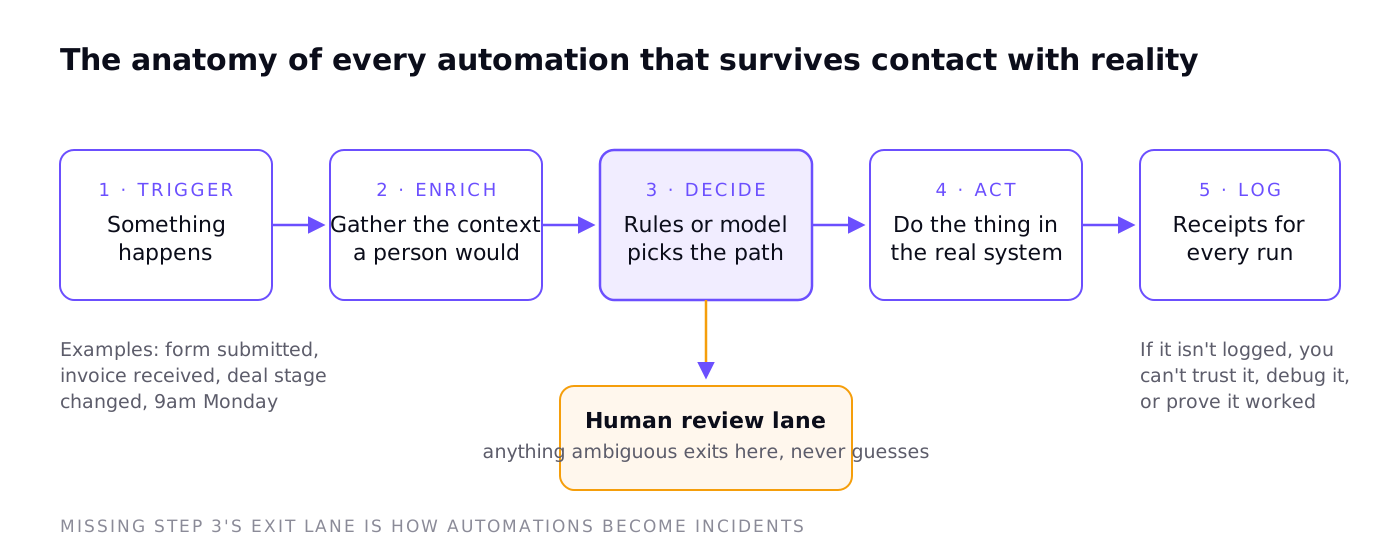
Two parts of Figure 2 get skipped in homemade builds, and both skips are expensive. The human review lane: an automation should never guess; anything ambiguous exits to a person, which is what lets the other 90 percent run untouched. And the log: if every run does not leave a receipt, you cannot debug it, trust it, or prove it worked. When we audit a broken automation, the missing piece is one of these two, almost every time.
Finance: where automation pays back fastest
1. Invoice intake and processing
The canonical example, because the before-and-after is so stark. Here is the same invoice traveling through a manual process and an automated one:
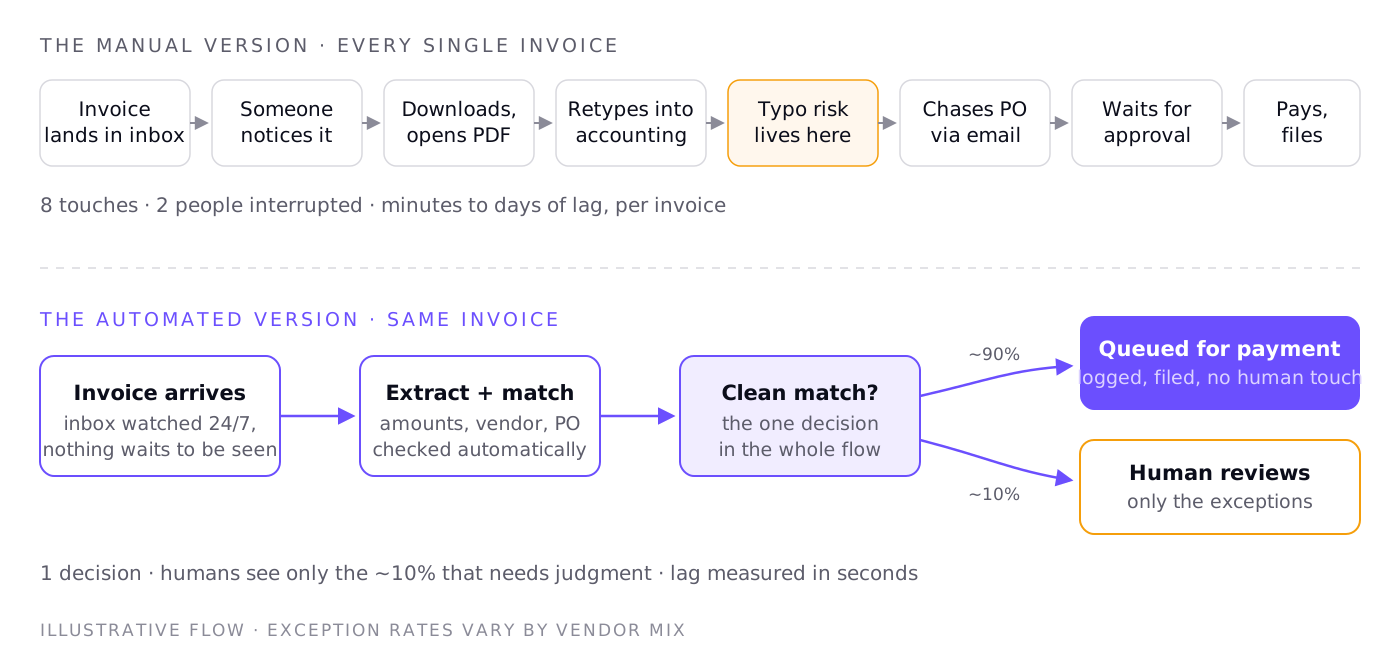
The math, and this is our arithmetic on typical volumes rather than a vendor's ROI slide: a business processing 300 invoices a month at roughly 12 minutes of combined handling each is spending about 60 hours a month on this. At a loaded cost of $30 an hour, that is $1,800 a month of skilled attention spent retyping numbers that were already digital. The automated version costs cents per run to operate. Even after a real build cost, the payback window on volumes like these is typically weeks, not years.
2. Expense approvals
Trigger: an expense is submitted. Enrich: pull the policy, the person's history, the budget line. Decide: within policy and under threshold auto-approves; everything else routes to the right approver with the context attached, so the approver spends ten seconds instead of ten minutes. The win is not eliminating approval. It is eliminating the hunting that surrounds it.
3. Receivables chasing
Trigger: an invoice crosses its due date. The sequence escalates politely on a schedule, checks payment status before every send so nobody gets dunned for a paid invoice, and exits to a human the moment the client replies with anything other than payment. Businesses hate doing this manually, so it gets done late or never, which makes it one of the rare automations that directly pulls cash forward.
Sales: speed is the whole game
4. Lead intake and routing
Trigger: a form fill or inbound email. Enrich: company size, source, what page they converted on. Decide: route by territory or fit, score against your ideal profile. Act: create the CRM record, notify the right owner, send the acknowledgment. The entire flow runs in seconds, at 2 pm or 2 am.
Why does this matter so much? Because response speed is the one sales variable everyone agrees on and almost nobody executes. A lead that waits until tomorrow morning is a lead your competitor answered tonight. This is the automation we build most often, and it is usually the one that pays for the whole engagement.
5. CRM hygiene
Trigger: nightly. Sweep for deals with no next step, contacts with bounced emails, duplicates, stage-stuck opportunities. Act: fix what is rules-fixable, and put the rest in front of the owner as a short morning list. Nobody buys automation dreaming about clean CRM data, but every forecast and every handoff sits on top of it.
6. Quote and proposal assembly
Trigger: deal reaches proposal stage. The system assembles the document from approved blocks, current pricing, and deal specifics, then parks it for the salesperson to review and send: top-right quadrant of Figure 1, automation with a human gate. What used to be an afternoon of copy-paste becomes a five-minute review, and pricing errors from stale templates disappear because there are no stale templates.
Support: triage the flood, keep the humans human
7. Ticket triage and routing
Trigger: a ticket arrives. Classify by topic and urgency, attach the customer's history and plan, route to the right queue. Urgent-and-angry gets flagged for a person immediately; how-do-I questions get a suggested answer attached for one-click sending. The agent stops being a switchboard and starts being a fixer.
8. Reply drafting with review
For the recurring 60 percent of questions, a model drafts the reply from your documentation and the customer's context, and a human approves it. Note the design: drafts, not sends. The Klarna arc we covered previously is the cautionary tale for skipping the review lane on customer-facing text; the durable wins keep a person on the send button until the data says otherwise.
9. The follow-up loop
Trigger: ticket resolved. Wait a day, ask for a rating, and here is the part everyone skips: route bad ratings back to a human as a reopened conversation, not into a dashboard nobody reads. The automation is trivial. The discipline of closing the loop is the value.
Operations: the glue work nobody was hired to do
10. Employee and client onboarding
Trigger: contract signed or offer accepted. Accounts created, folders built from templates, kickoff scheduled, welcome pack sent, owner assigned to each human step, with the checklist tracking itself. Onboarding is twenty small tasks across five tools, and the failure mode is always the same: step eleven lived in someone's head. Automation's real gift here is that nothing depends on memory.
11. Recurring report assembly
Trigger: Monday 7 am. Pull the numbers from each source, assemble the document in your format, flag anything anomalous, and park it for a human to add the two sentences of interpretation that actually matter. The analyst stops being a courier between dashboards and a slide deck. Fair warning from the audit trenches: this one has the strongest pull toward skipping the review step, and an unreviewed wrong number in a Monday report costs more trust than the automation ever saved.
12. Data sync between tools
The least glamorous example and the most reliable payer. Trigger: a record changes anywhere. Act: the same fact updates everywhere else it lives, logged. Every business past about ten people has a person whose unofficial job is retyping things from one tool into another; every retype is a chance to make the systems disagree, and disagreeing systems are where reporting goes to die.
What these twelve have in common
| Pattern | Why it matters |
|---|---|
| The trigger is an event, not a person remembering | Anything that starts with "someone notices" has lag and leakage built in |
| Judgment stays human, movement gets automated | The machine does the fetching, typing, and routing; people make the calls |
| Ambiguity exits to a review lane | The automation never guesses, which is exactly what lets 90% run untouched |
| Every run is logged | Receipts are what make an automation trustable, debuggable, and provable |
| The math is boring | Minutes times frequency times loaded cost. If that number is small, don't build it |
Three ways these projects die
- Automating a broken process. If the manual version is a mess, the automated version is the same mess at machine speed. Fix the process on paper first; the automation should copy a process that already works.
- No exception lane. The build that handles the happy path and guesses at everything else works brilliantly in the demo and becomes an incident in week three. Design the exit to a human before designing anything else.
- Nobody owns it. Automations are software: tools change their interfaces, APIs deprecate, volumes shift. An automation without a named owner and a log to check is a future outage with a countdown you can't see.
How to actually start
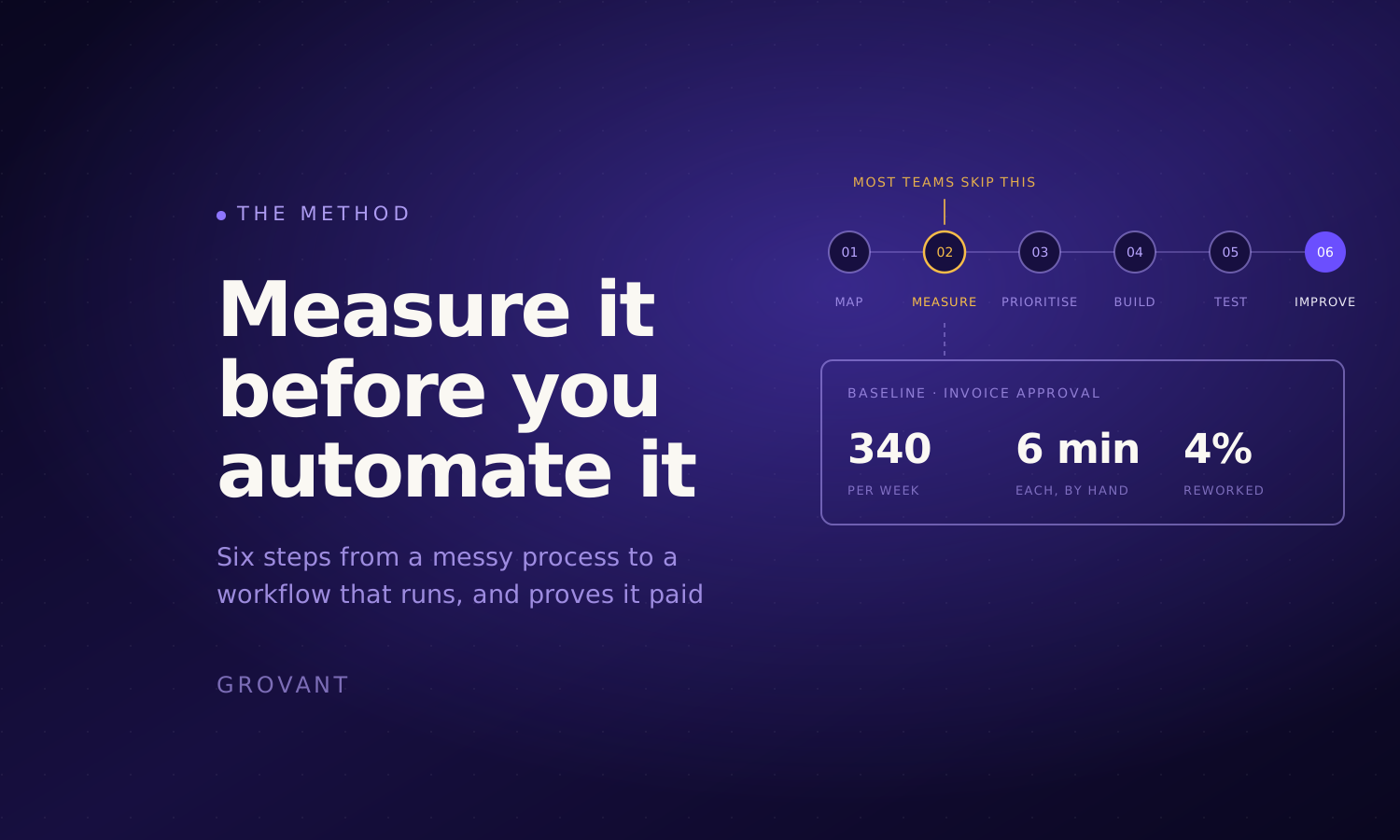
Not with a tool. With a list. Write down the ten most repetitive workflows in your business, plot them on the Figure 1 grid, and take the bottom-right winner through the anatomy in Figure 2 on a whiteboard before anyone builds anything. If you can draw the trigger, the decision, the exception lane, and the log, the build is the easy part. We wrote up why most automation pilots fail as the companion piece to this one; the short version is that mapping beats buying, every time.
The mapping is also the part we give away. A senior automation engineer walks through how your team actually works, finds the workflows worth automating, and hands you the ranked list with an estimated cost per run for each. Free, takes a few days, and the map is yours whether or not we build any of it.
And if the map says your bottleneck is not a workflow but a system that needs building, that is a different conversation, and we wrote a guide for that one too.